

You might have noticed: Next to the +Button there’s a “Shiny” button that you might recognize as the “I’ve got a sparkly AI-option” button. And indeed, hovering over it tells us it allows us to add a section using AI. So, let’s smack the button with a mouse click and see what we can cook up with this.

Clicking it opens up expected the dialogue menu for a prompt, along with some suggestions “for you” like a introductionairy home page, meeting the team and some “handy links and sources”. I don’t know why those are suggested to me, I have isolated this site on purpose from my others, I am using a communication site not a Teamsite and I am not sure what my AI companion considers “important links to much used document, tools or external websites.
I am, however, totally in the mood to spar with this and click around to find out.
So, for the first AI-suggested input I’m gonna go with the prewritten prompt: “Create a section about the purpose and content of this homepage. Provide a brief introduction so visitors immediately understand what they can find on this site and why it is relevant.”
Behold! The result~!

As with most AI-generated suggestions, it gives you a couple of options through which you can browse using the arrow keys. It also gives you a textbox in which you may write down your 100-word essay on what to improve or change. The spinny arrows let you spin the wheel of fortune for another AI-go. Or…well you can choose to either go back to your prompt or add the choosen AI-section to you page. For now, I’m gonna keep this on and move to the next section, as I’m curious to see what the consistency is gonna be between content that’s already there and the continuation with AI-prompted sections.
First thing that I notice is that it takes a bit longer now to come up with three suggestions. This time, they are a bit different as it let’s me choose between: Teammembers in a blink (a bit different than the suggestion in the first try), again the same “usefull links and sources” and another called “FAQ”. Now that’s the intriguing one for me, as I’ve written a blog about that particular FAQ-webpart as well…
But first, let’s give it what it wants and let it try to specify my non-specified teammembers. Have I mentioned you can add file-references by using the little paperclip button? Now you know 😀
What we also know now: it you don’t specify anything, it comes up with this brilliantly blank section-suggestion. To it’s credit, it does come with a people-webpart in order for you to manully add in your lovely non-AI collegues. To be honest, I didn’t really need AI for this hahaha.
Third try is a charm right? Again, the loading time gets a tiny bit longer. The suggestions are moving along, with the “Usefull sources and links” now being named in that order. It now also offers me the “Most important highlights of <site>” and a FAQ.
By now, it is starting to kinda bug me that although I have my interface in English, some suggestions come in Dutch. Keep that in mind for your other-lingual admins or Site-owners.
I do have to say though, three might be a bit of a charm, as this section seems to be able to at least incorporate something of my lovely calming pine-green theme.

I also just HAD to hit the “Design ideas” button, as I love to discover something new. As expected, it opens a panel to the right with some suggestions. Kinda like in PowerPoint, but I guess…Better? Yeah well I noticed it at least tries to come up with some alternatives within the possiblities of the incorporated webparts in the sections, like a different background, button size and button-layout. Of course I went with the pinethree option, but to say this AI understands that my theme is pine-green coloured and has pinethrees, no. No this is kinda random, as ita lso suggested dark-blue, a frog (which kinda fitted the aesthetic) some ugly generic blocks and a mega-generic background.
And I did not feel spinning the fortune wheel for more ideas. I leave that craziness up to you, I’m here to write something. 😊
F is for Four, so FAQ time.
Prompting this generic one gets us three different options, of which only the second preview looks like a FAQ with collapsable sections. Behold and compare them! We get two options which are just text-webparts. Knowing I’ve written an entire blog about the AI-FAQ webpart, I was curious to see what would be created with the most-FAQ-looking option, so I choose that.
Well…FAQ this… My hope kinda went out of the window as it just indeed created a multitude of collapsable sections. Funny enough, it did provide answers, which the FAQ-webpart in its preview mode didn’t even do.

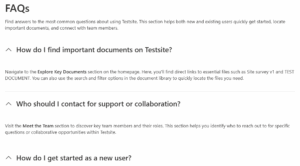

So ok, I’m gonna try to end on something exciting. And as if my SharePoint-AI-section companion is trying to imitate this vibe, it suggests “next steps and expectations”, “most important highlights” and “upcoming features and improvements”. Hahaha, why do I find this funny?
Well, here you go little AI-buddy, give me some upcoming featues and improvements. What do we see in the future, so proudly displayed by your iconic “rocket-icon”.
The future seems bleak with only two options instead of three? Both are still not really in touch with my theme. But you know? I’m gonna give it another try and spin the spinny arrows for a couple more suggestions. And…it only adds one more with little to no change…really… Ok suggestion box time! Go!
“Make it shorter?”Darling, this is already kinda short (and bland). “Change the background to a gradient”…The gradient of white?
Ah well I just pulled in the help of Desin Ideas, cause you know, it’s really hard to manually change your section background to pine-green (spoiler, it is not).
To summorize…My thoughts right now is that this AI-section generator in SharePoint only works if you really know absolutely nothing about SharePoint and are way to afraid to try and hit some buttons to see what happens.
It might be good in a pinch…I kinda understand that the design options on the quick links part can help people display it’s versatile options better, you kinda see what SharePoint can do with certain webparts, without having to figure it yourself.
But…yeah I am mildy enthousiastic. But…Open to see and discuss some other examples. Maybe this little test was too little, maybe I should’ve tried some prompts of my own.
I am really curious to hear and see some of other people’s findings in this. Chat me up and let me know, ready to learn and adjust my view.






Leave a Reply